How to Plan a Low Voltage Cabling and Rack & Stack Deployment in 5 Steps

A multi-site low voltage cabling and rack & stack deployment requires more than sending technicians to each location. The project must be planned as a repeatable field service operation with consistent standards, clear site documentation, coordinated installations, and defined acceptance requirements.
This guide presents a five-step planning process for businesses, project managers, IT teams, and managed service providers coordinating networks, access points, servers, and related infrastructure across multiple locations.
The five steps are:
- Scope and site survey
- Cabling runs and pathways
- Rack & stack and hardware installation
- Network, access point, and server turn-up
- Testing, documentation, and handoff
1. Confirm the Scope and Complete a Site Survey
Do not schedule installation work until the requirements for each location are documented. A site survey provides the information needed to estimate labor, identify access restrictions, verify existing infrastructure, and create a location-specific work plan.
Define the deployment scope
Create a separate scope record for every site. Include:
- Number of buildings, floors, rooms, and telecom closets
- Required data drops and voice connections
- Access point locations
- Switches, routers, firewalls, and other network equipment
- Server, storage, and backup equipment
- Security, alarm, camera, or access control connections
- Existing cabling that will remain in service
- Cabling or equipment scheduled for removal
- Required installations, upgrades, or maintenance
- Business hours and approved work windows
- Site contacts, access procedures, and escort requirements
Use the same scope template at every location. This makes it easier to compare sites, order materials, assign remote techs, and track incomplete work.

Perform the physical survey
A site survey should verify actual field conditions instead of relying only on drawings or information supplied by a third party. The field service technician should document:
- MDF and IDF locations
- Server room and equipment room conditions
- Rack dimensions and available rack units
- Existing patch panels and cable labels
- Cable tray, conduit, J-hook, and raceway availability
- Ceiling type and access requirements
- Wall construction and penetration points
- Power outlets, dedicated circuits, UPS units, and PDU requirements
- Grounding and bonding conditions
- Heating, cooling, water, and environmental risks
- Fire-rated walls and required firestopping
- Conflicts with electrical, HVAC, plumbing, and other building systems
Take photographs of relevant conditions. Record measurements, pathway distances, equipment locations, and obstacles. Include this information in the site survey package.
For multi-site deployments, complete surveys in a consistent format. A standardized survey reduces change orders and gives the project manager a reliable basis for scheduling and procurement.
2. Plan Cabling Runs and Pathways
After the survey, design the cabling routes for each site. The objective is to create organized, serviceable pathways that support current requirements and future network upgrades.
Identify each cable run
Assign a unique identifier to every planned run. The identifier should connect the work area, patch panel, switch port, and final device.
A cable schedule may include:
| Field | Example |
|---|---|
| Cable ID | TXK-IDF1-PP01-024 |
| Origin | Office 214 data outlet |
| Destination | IDF 1 patch panel port 24 |
| Cable type | Cat6A |
| Endpoint | Switch 1 port 24 |
| Service | Data |
| Test status | Pending |
Use the same labeling format across all locations. Label both ends of each cable. Label patch panels, racks, access points, switches, and other network equipment before final testing.
Select the appropriate pathways
Depending on the building, cabling may use:
- J-hooks
- Cable tray
- Conduit
- Raceway
- Riser shafts
- Raised floor pathways
- Ceiling pathways
- Existing sleeves and penetrations
Verify pathway capacity before installation. Do not assume an existing tray or conduit has sufficient space. Document areas requiring new pathway construction or additional supports.
Low voltage cabling should be routed separately from electrical wiring when required by applicable code, building requirements, or manufacturer instructions. Avoid unnecessary exposure to motors, transformers, fluorescent fixtures, and other potential sources of interference. Plan bends, pull points, service loops, and transition points before the cable is pulled.
Define cable and firestop requirements
Specify the required cable category and jacket rating for every installation. The project may require copper, fiber, plenum-rated cable, riser-rated cable, or a combination of cable types.
Document every wall, floor, or ceiling penetration. Firestop materials and installation methods should follow the applicable building requirements. Record the completed locations in the as-built documentation.
3. Plan Rack & Stack and Hardware Installation
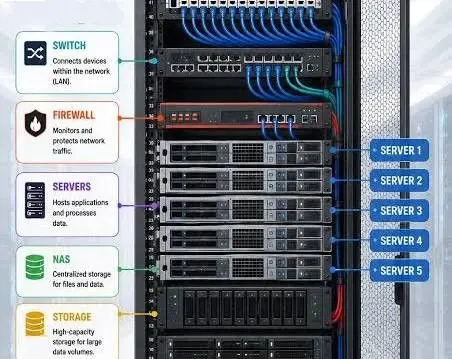
Rack & stack work includes preparing the rack, mounting equipment, connecting patch panels, installing switches, and organizing the equipment for serviceability.
Create a rack elevation
Prepare a rack elevation for every MDF, IDF, and server room. The elevation should show:
- Rack number and location
- Patch panels
- Horizontal and vertical cable managers
- Switches and routers
- Firewalls
- Servers and storage
- UPS units and PDUs
- Fiber enclosures
- Blank panels
- Available space for future equipment
Use consistent rack layouts across the deployment where practical. Place patch panels and cable managers near the top of the rack, network equipment in the designated switching area, and heavier servers or storage equipment in supported lower positions.
Confirm rack depth, weight capacity, power availability, cooling, front and rear clearance, and anchoring requirements. Do not install hardware until these conditions are verified.
Prepare the bill of materials
The bill of materials should include both equipment and installation materials:
- Racks and rack hardware
- Patch panels
- Copper and fiber cabling
- Keystone jacks and connectors
- Cable managers
- Labels
- Fiber trays and enclosures
- Switches and routers
- Wireless access points
- Servers and storage
- PDUs and UPS units
- Mounting brackets
- Firestop materials
- Test equipment and consumables
Include reasonable spare quantities for connectors, patch cords, labels, and other items that may be damaged or misplaced during field work.

Define installation responsibilities
Assign responsibility for each task:
- Low voltage cabling installation
- Rack assembly
- Hardware mounting
- Patch panel termination
- Fiber termination or patching
- Access point mounting
- Server installation
- Network configuration
- Testing and quality assurance
- Documentation and sign-off
A business may use internal IT staff, a managed service provider, remote techs, on demand staffing, or a combination of resources. Define who supplies materials, who owns configuration, and who approves completed work.
4. Complete Network, Access Point, and Server Turn-Up
Hardware installation is not the same as operational turn-up. Turn-up requires coordination between the field team and the network or systems team.
Verify network equipment
Before connecting equipment, confirm:
- Device model and serial number
- Rack position
- Power connection
- Uplink destination
- Switch port assignment
- VLAN assignment
- Management IP address
- Firmware or software requirements
- Monitoring enrollment
- Configuration backup process
Use standardized configuration templates where possible. Record all deviations from the approved design.
Install and validate access points
Access points should be installed at the locations identified during the survey or wireless design process. Confirm mounting method, cable path, PoE availability, switch port assignment, and labeling.
At turn-up, verify that each access point:
- Receives power
- Establishes a network connection
- Joins the wireless controller or management platform
- Uses the correct name and location
- Broadcasts the approved SSIDs
- Receives the correct VLAN and policy
- Provides acceptable coverage in required areas
A basic field check is useful, but some projects may require a formal wireless survey or performance test.
Install and turn up servers
For server and storage equipment, verify rack location, power feeds, network connections, management access, and environmental conditions. Coordinate operating system, hypervisor, backup, monitoring, security, and application requirements with the responsible IT team.
A field service technician may complete the physical server installation while a remote systems team completes configuration. Document the handoff between those teams.
5. Test, Document, and Complete the Handoff
No site should be marked complete based only on visual inspection. Testing and documentation provide evidence that the installation meets the project requirements.
Test the cabling
Test copper and fiber according to the cable category, project specification, and required acceptance criteria. Testing may include:
- Wire map
- Continuity
- Length
- Insertion loss
- Return loss
- Near-end crosstalk
- Fiber loss
- Fiber polarity
- OTDR testing when required
Save test results by site and cable ID. Identify failed runs, correct the issue, and retest before handoff.
Test the network
Verify:
- Switch port link status
- Negotiated speed
- PoE delivery
- Uplink connectivity
- VLAN assignments
- DHCP and DNS operation
- Internet or WAN connectivity
- Access point registration
- Server reachability
- Monitoring and alerting
- Backup or configuration capture
Test representative endpoints from each major area. For high-priority systems, complete end-to-end validation with the business owner or IT administrator.
Complete the documentation package
The final package should include:
- Updated floor plans
- Cable schedules
- Patch panel and switch-port maps
- Rack elevations
- Access point locations
- Equipment inventory
- Serial numbers
- Configuration backups
- Cable test reports
- Open issue list
- Photos of completed work
- Maintenance recommendations
- Support and escalation contacts
Use the same closeout checklist at every location. Obtain written approval or electronic sign-off before moving to the next deployment wave.
Coordinate Multi-Site Support With One Dispatch Partner
A multi-site deployment may require different types of support at different stages. One location may need low voltage cabling. Another may require rack & stack work, access point installation, server placement, commercial inspections, or post-installation maintenance.
Texarkana2Go provides field services, on site support, remote support coordination, installations, upgrades, inspections, and temporary field labor for business and private clients. The service area extends approximately 120 miles from Texarkana, Arkansas, including:
- Texarkana, USA
- Shreveport and Bossier City, Louisiana
- Little Rock, Arkansas
- Nashville, Arkansas
- Idabel and Broken Bow, Oklahoma
- Mount Pleasant, Texas
- Atlanta, Texas
- Longview, Texas
Travel fees may apply outside the free 25-mile service zone. Project managers can review available support through the field services page.
Request a Dispatch
Prepare the site list, scope, required dates, access instructions, and expected deliverables before submitting a request.
Request field service dispatch
Include:
- Number of sites
- Service locations
- Required work
- Installation or upgrade details
- Network, cabling, access point, or server requirements
- Site access restrictions
- Preferred schedule
- Testing and documentation requirements
Submit dispatch request.